


Google Search Console is my first pick; add a free tool when you have a job it can help you finish.
| Your job | My pick |
|---|---|
| Check Google search performance | Search Console |
| Audit your own site | Ahrefs Free |
| Crawl a small site | Screaming Frog |
| Find keyword ideas | Keyword Planner |
| Check Bing | Bing Webmaster Tools |
Start with a page you can improve. Pay when a limit stops that work; a software subscription still needs someone to make the change.
The best free SEO tools in 2026 start with Google Search Console, Ahrefs Free and Screaming Frog.[1][2][3][4] Add Google Keyword Planner for keyword ideas and Bing Webmaster Tools for Bing checks.[5][6]
I run Searchmaxxed. These five picks are my selection from the vendors' published pages, not a hands-on software test.
Which are the best free SEO tools to start with?
Start with Google Search Console for your site's Google data, then add Ahrefs Free for site checks or Screaming Frog for crawl work.[1][3][4] Choose the next tool by the job, rather than opening every account at once.
| Tool | Best for | Starting price | Engines tracked |
|---|---|---|---|
| Google Search Console | Your Google performance | Free | |
| Ahrefs Free | Verified-site audits and backlinks | Free tier | Google keywords |
| Screaming Frog SEO Spider | Small-site technical crawls | Free version | Site crawler |
| Google Keyword Planner | Keyword ideas and search trends | Free resource | Google Ads planning |
| Bing Webmaster Tools | Bing checks and submissions | Free | Bing |
The engines column shows what each tool reports on. None of the five is a tool for tracking AI answers across platforms.
A free service and a free tier give you different choices. Search Console is free; Ahrefs restricts its free access to verified sites and set allowances.[2][3][9] Screaming Frog lets you crawl up to 500 URLs before you need a licence for larger crawls.[4]
1. Google Search Console: my first pick for Google data
Google Search Console is my first pick for understanding how your site performs in Google. It reports queries, impressions, clicks and position.[1] I would start there before choosing another reporting tool.
- What it does: Search Console reports search performance and supports sitemap submission.[1] URL Inspection gives you crawl, index and serving details.[1]
- Engines tracked: Google Search, with information about your own pages.[1]
- Starting price: Free.[2]
- Free trial: No trial needed; the service is free.[2]
- What it cannot do: It doesn't give you a competitor's private Search Console reports.[2] Its data covers your website.[2]
- Best for: I recommend it for an owner who wants to choose page work from their own Google performance.
Pick a service page and examine the queries bringing it impressions and clicks.[1] Then read the page against those queries. My first question would be whether it answers the service question clearly enough to earn an enquiry.
2. Ahrefs Free: my pick for verified-site audits
Ahrefs Free is my pick for combining technical checks with backlink and keyword research on a site you control. Site Audit checks faults; Site Explorer shows organic keywords and links.[3]
- What it does: Ahrefs Free supplies analytics, technical audits and SEO metrics for verified websites.[3] Ahrefs now calls its Webmaster Tools offering Ahrefs Free.[3]
- Engines tracked: Its Site Explorer reports Google keywords.[7] Paid subscriptions extend the scope to unverified competing websites.[10]
- Starting price: Free for websites with verified ownership.[3]
- Free trial: This is a free tier with allowances, rather than access to every paid feature.[3][10]
- What it cannot do: Free Site Explorer has a visible-at-once limit of 1,000 backlinks and 1,000 keywords.[11]
- Best for: I would choose it when I can verify the site and need both technical findings and link information.
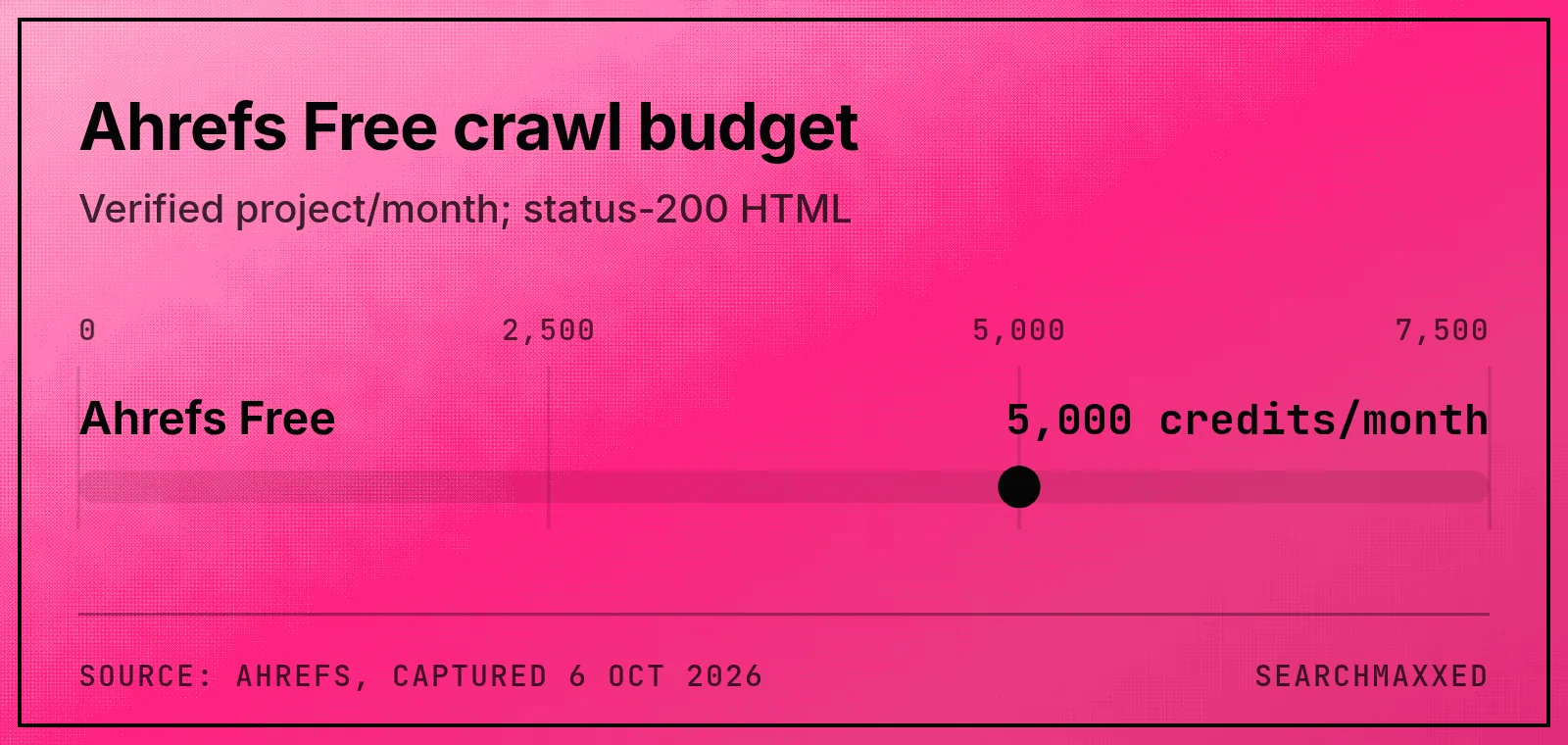
Site Audit allows 5,000 crawl credits per verified project per month.[9] Only status-200 HTML pages consume those credits.[9] Plan repeat audits against that monthly budget before treating the free tier as unlimited.
3. Screaming Frog SEO Spider: my pick for small-site crawls
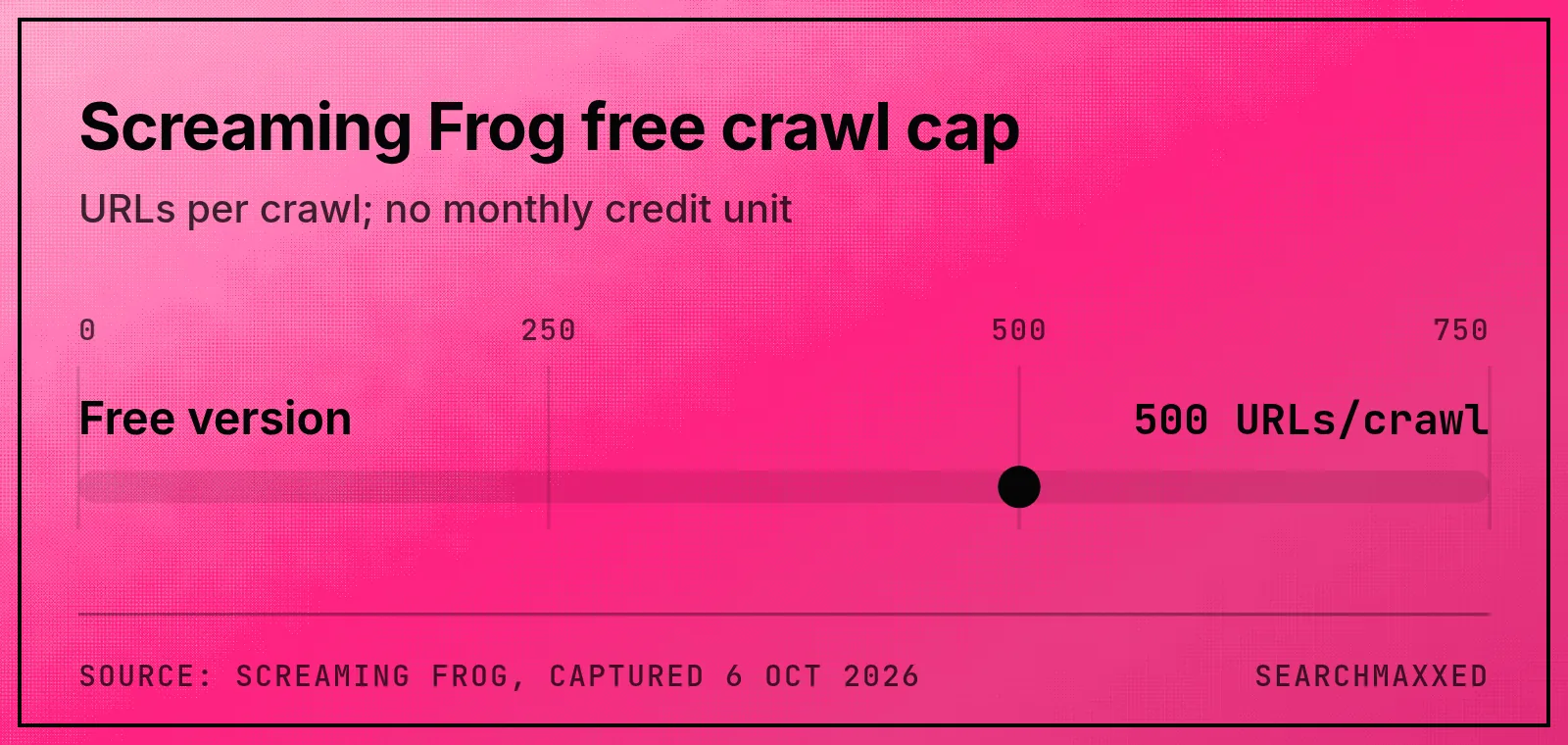
Screaming Frog SEO Spider is my pick for a technical crawl that fits within its free limit of 500 URLs.[4] A licence allows larger crawls and advanced features.[4]
- What it does: The free version finds broken links, errors and redirects.[8] It also reviews titles, metadata and exact duplicate pages.[8]
- Engines tracked: It crawls your website; treat its findings as site checks, not a search-position report.[8]
- Starting price: The free version has a 500-URL crawl limit.[4]
- Free trial: Screaming Frog offers a free version alongside its paid licence.[4]
- What it cannot do: It cannot finish a crawl beyond that free cap.[4] Paid crawling still depends on available memory and storage.[12]
- Best for: I recommend it when you have a small site or a bounded technical question to investigate.
Start with broken links and pages whose titles fail to describe their content. The crawler supplies those checks.[8] For a larger repair job, our technical SEO work explains the work around crawl findings.
4. Google Keyword Planner: my pick for new keyword ideas
Google Keyword Planner is my pick for finding new keyword ideas when you have Google Ads access. Google describes it as a free resource for advertisers.[5] I treat its numbers as advertising context.
- What it does: It generates keyword ideas and bid estimates for search campaigns.[5] It also reports keyword search trends over time.[13]
- Engines tracked: Google Ads planning; its published purpose centres on advertising campaigns.[5]
- Starting price: The tool is free.[5] Google's published instructions require Ads account setup and campaign creation.[5]
- Free trial: Google calls it a free resource, rather than a time-limited trial.[5]
- What it cannot do: Keyword ideas and bid estimates don't tell you where your website ranks in organic search.[5]
- Best for: I recommend it for exploring terms around a product or service before choosing a page topic.
Keep ad bid estimates separate from your judgement about an organic search result. Compare the keyword idea with the pages Google returns before deciding what to build.
Check what data your account shows before relying on exact search volumes.
5. Bing Webmaster Tools: my pick for Bing checks
Bing Webmaster Tools is my pick for adding Bing checks to a Google-focused workflow. Marketer Milk describes free technical checks, sitemap submission and requests to index individual pages in Bing.[6]
- What it does: It supports technical site checks and Bing submissions.[6] I would use it to investigate Bing separately from Google.
- Engines tracked: Bing is the supported scope for this recommendation.[6] Check its current AI coverage separately before choosing it for that job.
- Starting price: Free.[6]
- Free trial: Marketer Milk describes a free tool, rather than a paid-plan trial.[6]
- What it cannot do: I would keep Google and AI-answer checks separate from its Bing submissions.
- Best for: I recommend it for a site owner who wants to include Bing in their search checks without buying another suite.
I would start with the sitemap and a page that matters to the business. Investigate the page in each engine before deciding it has one shared problem.
How do you choose free SEO tools?
Choose free SEO tools by the job you can finish with them. Name the page and the change before you open another account.
Start with these questions:
- Do you need to understand your own Google traffic? Start with Search Console's queries, clicks and impressions.[1]
- Do you need a site audit and backlink information? Consider Ahrefs Free if you can verify ownership.[3]
- Do you need a crawl of a small site? Check whether Screaming Frog's 500-URL cap fits the job.[4]
- Do you need new keyword ideas? Keyword Planner provides ideas and search trends.[5][13]
- Do you need Bing checks? Add Bing Webmaster Tools for its own submissions and technical checks.[6]
Before opening another report, write down the change you expect to make. A better title, a repaired link and a new service page are different jobs.
For broader planning, our SEO services and content strategy explain how we choose and build pages. Our free tools also need no account, trial or credit card.
What do free SEO tool limits mean in practice?
Ahrefs Free has a monthly crawl-credit budget and a visible-results limit; Screaming Frog has a per-crawl URL cap.[9][11][4] Compare each allowance with the job you need to finish, because those units describe different restrictions.
| Tool and limit | What it means for your work |
|---|---|
| Ahrefs: 5,000 crawl credits/project/month | Budget repeat crawls of status-200 HTML pages. |
| Ahrefs: 1,000 backlinks visible at once | Filter the view; it isn't your total backlink count. |
| Ahrefs: 1,000 keywords visible at once | Focus the view; it isn't your total keyword count. |
| Ahrefs: verified websites | Broader unverified competitor research needs paid access. |
| Screaming Frog: 500 URLs | A crawl beyond the cap needs a licence. |
Ahrefs excludes broken URLs, redirects and non-HTML resources from its crawl-credit consumption.[9] Screaming Frog's free allowance counts URLs.[4] So the two numbers aren't the same "pages you can audit for free".
How can you audit your website for SEO for free?
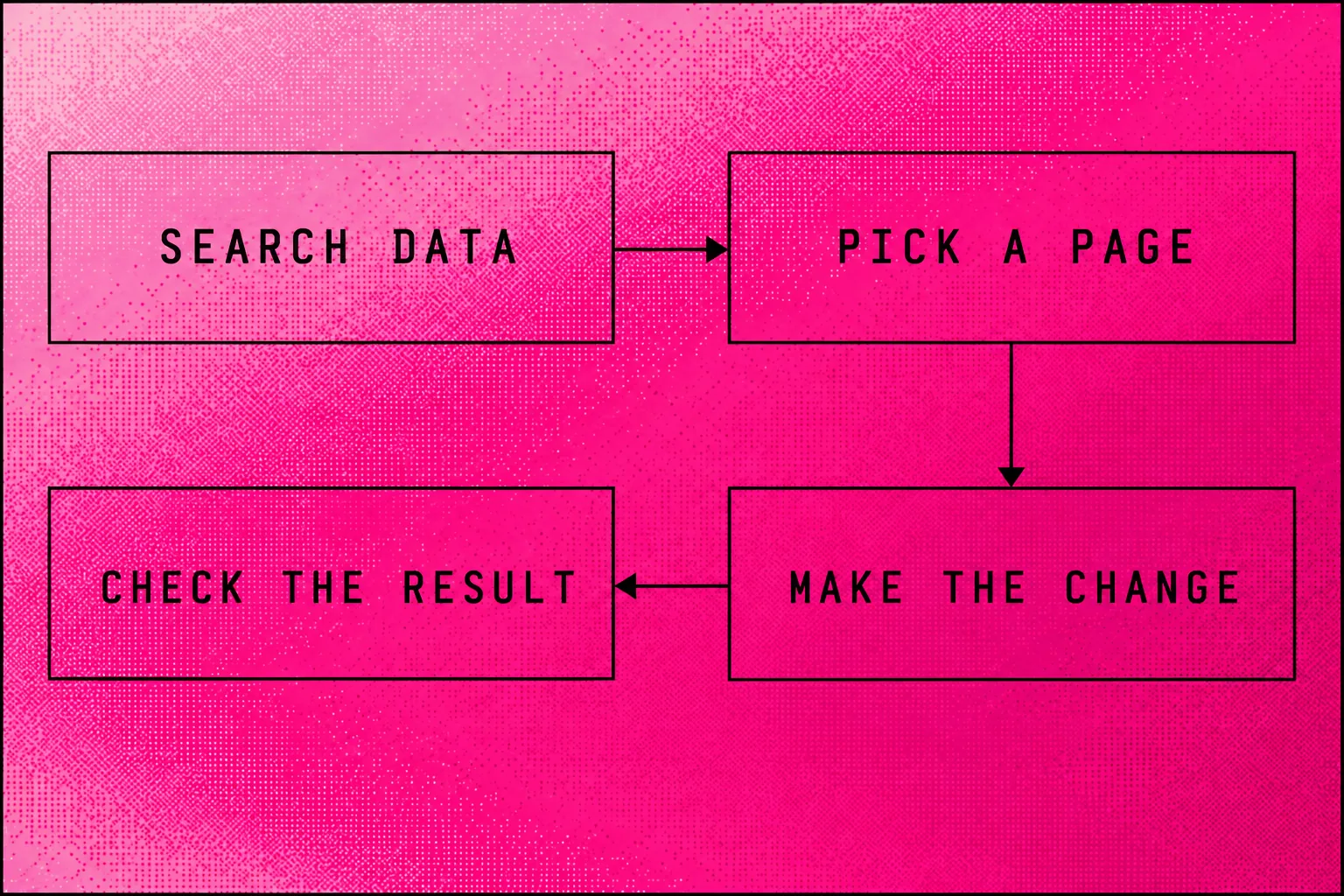
For a free SEO audit, follow five steps: check Search Console, inspect the page, crawl, fix and review. Use Google Search Console with Ahrefs Free or Screaming Frog for the data.[1][3][8] Ahrefs requires verified ownership.[3] Make changes only on sites you have permission to edit.
I would run this sequence:
- Pick an important service or product page. Check its Google queries, impressions and clicks in Search Console.[1]
- Inspect that URL's crawl and index details before deciding its wording needs work.[1]
- Use Ahrefs Site Audit for technical findings, or Screaming Frog for broken links, redirects and title checks.[3][8]
- Choose one repair whose purpose you can explain. Record the original problem and what you changed.
- Check the live page after the repair. Return to Search Console to review its search performance.[1]
For example, investigate an important page that gets impressions but few clicks. Read its title and content against the query before rewriting either. Then inspect whether the released page matches the change you intended.
If the problem concerns external links, our link-building service explains that separate scope.
When is a paid SEO tool worth it?
A paid SEO tool is worth considering when its extra access lets you finish a specific job. Name the job and the free limit that blocks it first.
Screaming Frog's licence allows crawls above 500 URLs and adds advanced features.[4] Ahrefs subscriptions provide higher allowances and analysis of unverified competing websites.[10] Those are concrete reasons to compare an upgrade.
| Upgrade | Published price and billing | Evidence date |
|---|---|---|
| Screaming Frog licence | USD $279 per user/year | 6 October 2026 |
| Ahrefs paid access | Starter from $29/month; currency not stated | 6 October 2026 |
Neither page states GST, and the Ahrefs price has no currency label.[12][14] Confirm both at checkout before comparing software with an Australian service quote.
If you need someone to carry out the changes, compare software access with delivery scope. Our Australian SEO cost guide and agency shortlist cover that next choice.
Where does Searchmaxxed fit?
Searchmaxxed runs the research and page work when you want a team to do it.
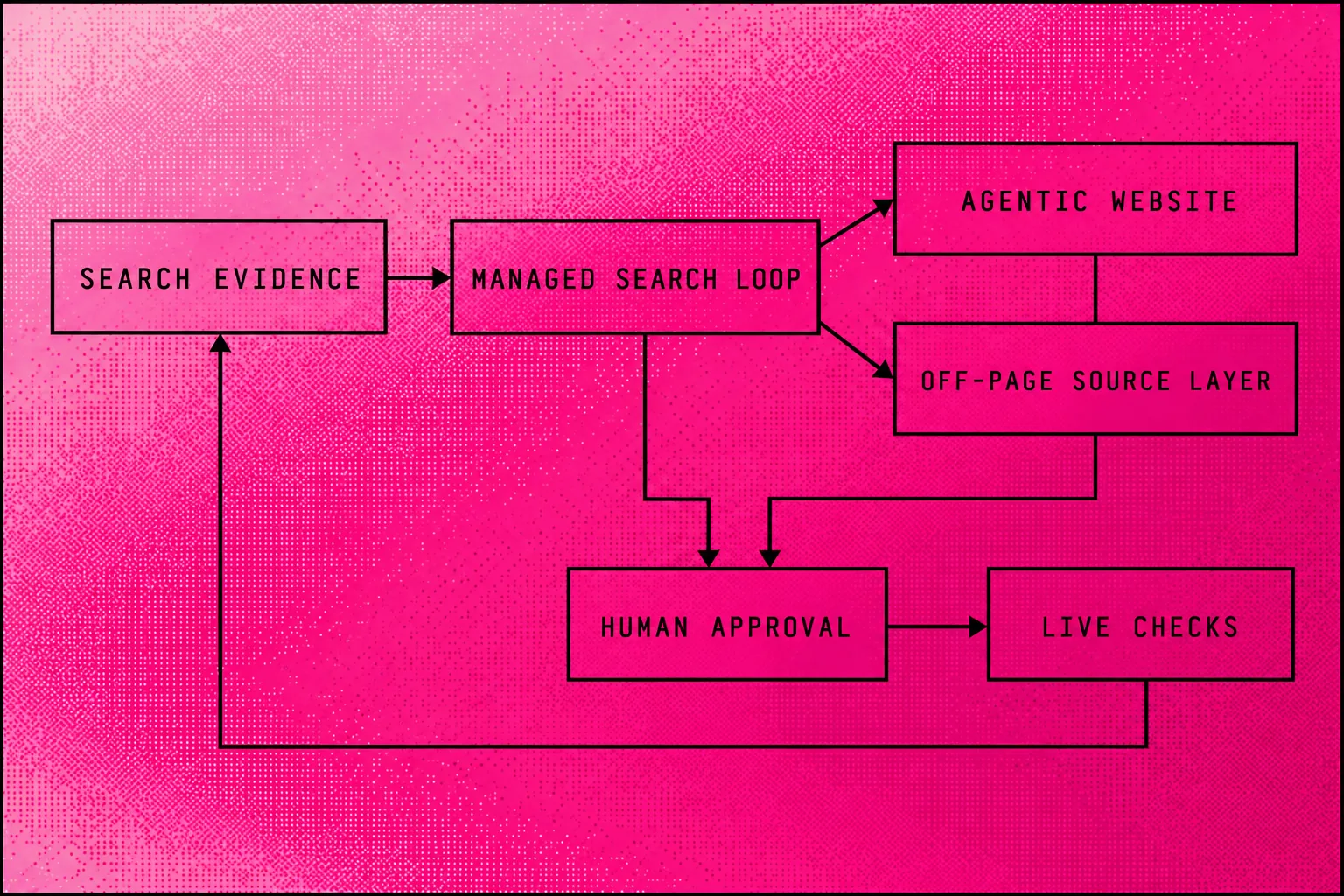
We do agentic SEO: AI agents help with the work, and people approve public changes. Our Queensland team connects your whole Search Console and GA4. The agents check competitors' sites, Google results and AI answers every week.
The Managed Search Loop compares that evidence with your plan. We choose the next page or fix, then build it on your Agentic Website. You own the website, content, data and repository on GitHub and Vercel.
For work beyond your site, the Off-Page Source Layer covers links, reviews, citations, press and mentions. We check what went live and use the new evidence to choose the next job.
I built Radiant Roof Repairs from zero to more than $1 million a year in revenue. SEO was the only marketing channel. I did the pages, research, competitor checks and updates manually.
Our packages set the scope:
- Local Search includes local pages, Google Business Profile work, reviews, citation cleanup and local tracking. Our local SEO service explains that work.
- Growth System includes page releases, landing-page work, technical fixes, source work and AI tracking.
- Agentic Search Engineering adds page capacity, comparison pages, press releases, digital PR and link campaigns.
- Custom & Enterprise can cover several markets, dedicated engineering, reporting and first-party research.
The Agentic Website Full Build covers research, site structure, design, technical SEO and measurement. Agentic Migration keeps a design worth keeping and moves the site to an owned repository. The AI SEO Audit identifies gaps and prioritises fixes.
Managed work includes AEO for answers to search questions. It also includes GEO for how generated AI answers describe you. The AI SEO explainer connects those terms to the work.
Frequently asked questions
What are the top 5 free SEO tools?
Can I do SEO for free?
Is SEO dead now with AI?
No, I wouldn't abandon Google search because AI answers exist. Search Console still provides queries, clicks and search-position data.[1] Check how your customers search before changing your search budget.
Can ChatGPT do an SEO audit?
Does Google have a free SEO tool?
What is the best free keyword research tool for SEO?
Is there a free SEO checker?
How can I check my SEO ranking for free?
Can Ahrefs Free analyse competitors?
Ahrefs Free's Site Explorer access centres on verified websites; paid subscriptions add analysis of unverified competing sites.[3][10] Ahrefs also offers a separate public Backlink Checker for a website or webpage.[15] Keep that standalone check separate from the scope of a full competitor investigation.
Is Screaming Frog free for unlimited crawling?
- Google: https://search.google.com/search-console/about
- Marketer Milk: https://www.marketermilk.com/blog/best-seo-tools
- Ahrefs: https://ahrefs.com/webmaster-tools
- Screaming Frog: https://www.screamingfrog.co.uk/seo-spider/pricing/
- Google Ads: https://ads.google.com/home/tools/keyword-planner/
- Ahrefs: https://ahrefs.com/free-seo-tools