


Do SEO yourself by checking Google access, improving pages for customer searches and tracking enquiries. Google's Starter Guide explains the foundations.[1]
- Check that Google can find your important pages before writing more.[2]
- Answer customer questions with clear page copy, titles and links.[3][4][5]
- Track search clicks alongside real enquiries. Give changes time before judging them.[6][7]
Pick an existing service page to improve this week. If you want someone to run the cycle, Searchmaxxed's Managed Search Loop covers research, changes and follow-up checks.
To do SEO yourself, check Google can reach your site and choose searches that match what you sell. Improve the right pages and add relevant links. Google's Starter Guide explains those foundations.[1] Track enquiries alongside search performance. Get help when you can't test a technical change or keep the work going.
Can a beginner do SEO without an agency?
Yes, SEO for beginners starts with learning Google's basics and applying them to an editable website.[1] I would start with page copy and internal links, then ask for help with changes you can't safely test.
SEO means search engine optimisation.[1] It helps search engines understand your content and helps people decide whether to visit your website.[1]
Google finds pages, processes their contents and chooses results for a search.[2] Those stages are crawling, indexing and serving results.[2] A page can enter Google's index without appearing for the searches you want.[2]
Treat the work as separate jobs. Can Google reach the page? Does the page answer the customer's question? Can the visitor enquire?
I did the pages, research, competitor checks and updates manually at Radiant Roof Repairs on the Gold Coast. Before Searchmaxxed, I built it from zero to more than $1 million a year in revenue using SEO as the only marketing channel. The Radiant Roof Repairs case study covers that work.
That was my business and its result. It gives you a reason to take the manual work seriously, without setting a revenue target for yours.
Which free tools do you need for DIY SEO?
Start with Google Search Console for search performance and Google Analytics for website traffic and behaviour; both tools are free.[6] Add Google's Keyword Planner when you need more search ideas.[6] I recommend keeping your plan and change record in a spreadsheet.
| Tool | What to check | What to save |
|---|---|---|
| Google Search Console | Queries, clicks, impressions and site issues. | A starting record for your target page. |
| Google Analytics | Website traffic and visitor behaviour. | Visits to the page you plan to change. |
| Google Keyword Planner | Search terms related to your services. | Phrases that describe work you sell. |
| Your browser | Read the search results and test your own page. | Notes on the question and page format. |
| A spreadsheet | Keep the jobs and changes together. | Page, change, date and next check. |
Search Console shows how your site performs in Google Search.[6] Analytics helps you understand what people do on your site.[6] Keep those questions separate when you review the work.
Add your website to Search Console and follow Google's setup instructions. Google's Starter Guide points owners to its account and reporting guidance.[8] If you need someone else's access, ask your website provider before changing anything.
For Analytics, check that the setup covers the enquiry or purchase you care about. Test a submission and confirm it reaches you. Keep completed enquiries in your sales records so you can compare them with website activity.
You can begin with this stack. Buy another tool when you can name the job it will do and who will act on its findings.
How to do SEO step by step?
Follow seven jobs in order: access checks, search research, page selection, page improvements, internal links, external records and a results review. You need website editing access and a Search Console account. Google's guidance covers discovery, page content, titles, links and monitoring.[1][8][3][4][5]
| Job | Finish with |
|---|---|
| Check Google access | A clear status for your important page. |
| Choose customer searches | A phrase that matches what you sell. |
| Pick the right page | An existing page or a reason to create one. |
| Improve the answer | Copy, title and images that explain the offer. |
| Add internal links | A route from related pages to the offer. |
| Build external records | Accurate profiles and relevant promotion. |
| Review results | A change record and your next job. |
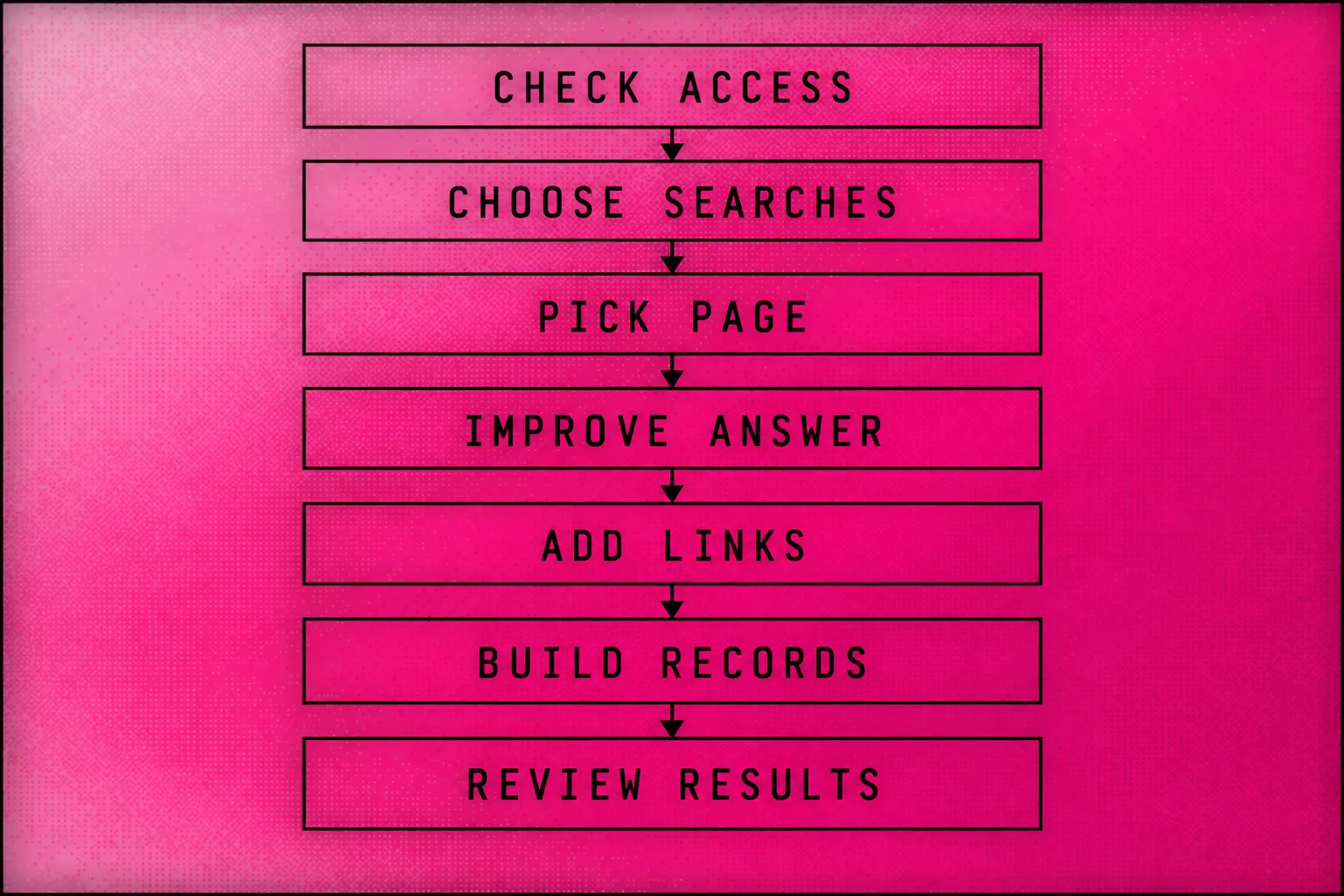
Check whether Google can find the page
Use Search Console's URL Inspection tool to check how Google sees an important page.[8] Google recommends this tool in its Starter Guide.[8]
Choose a page for a service you want enquiries about. Check it before adding a batch of new articles.
Google identifies server problems, access restrictions and rendering problems as possible barriers to crawling or indexing.[2] Rendering means running the page's code to see its content.[2]
If the report points to a technical fault, save the exact page and message. Ask your developer to explain the cause and proposed fix. Our technical SEO service covers this part of the work.
A sitemap contains the URLs you want search engines to find.[8] Some website systems create one for you, but Google doesn't require one.[8] Check what your platform already supplies before building another.
Choose searches that match your customers
Start with the words customers use when they ask for your service. Google advises considering both familiar terms and the language a beginner might use.[3]
Read the results for a phrase before choosing it. Note whether the pages sell a service, compare options or explain a problem. Use that observation to decide what you should offer on the page.
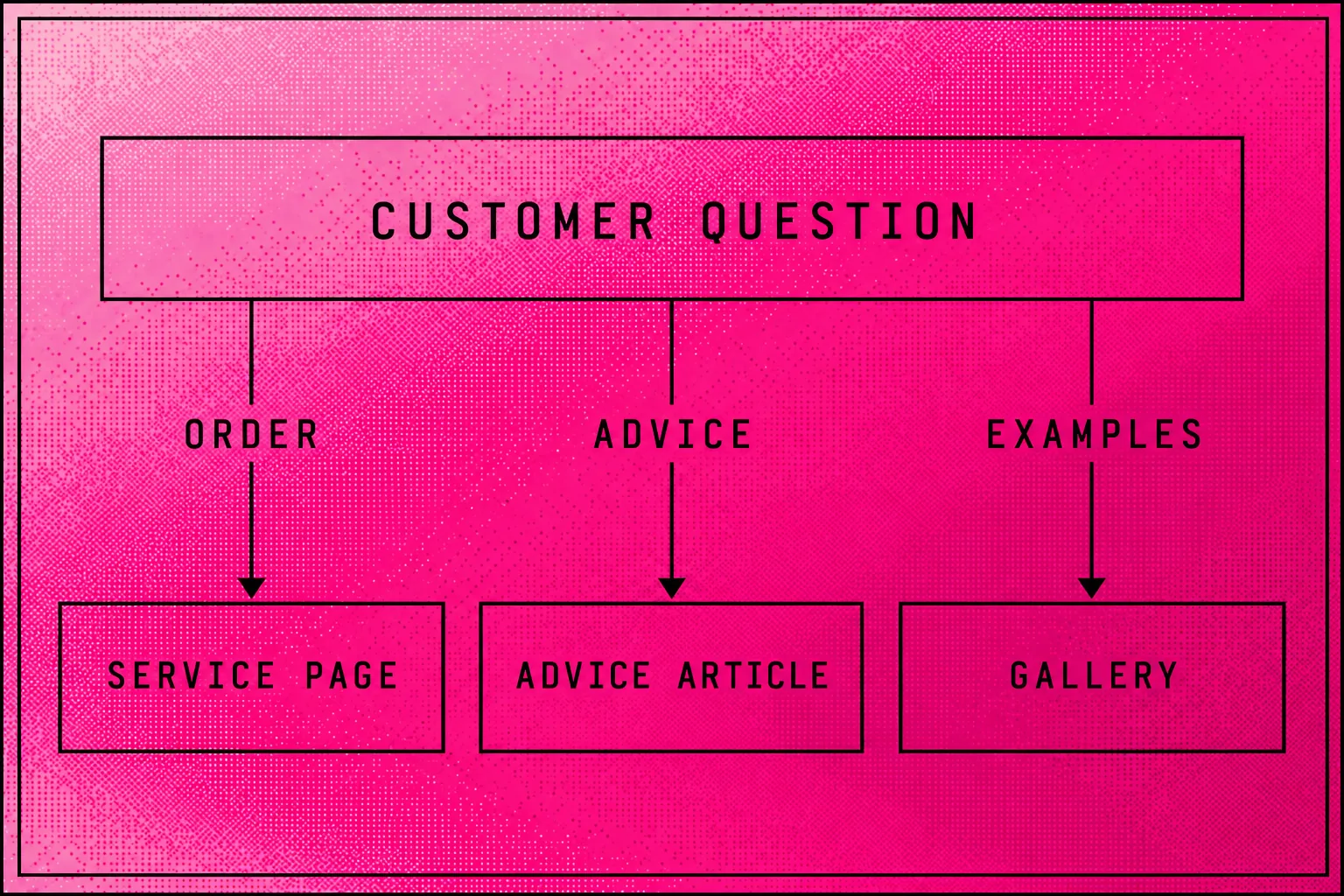
For an illustrative Australian bakery, compare these questions:
| Example search | My page choice |
|---|---|
| Birthday cakes Brisbane | A cake-order page, if the bakery serves Brisbane. |
| Does buttercream need refrigeration? | An advice article with verified food guidance. |
| Wedding cake styles | A gallery with the bakery's real work. |
Use these as starting examples. Check your own market before choosing a target.
The page for orders should explain the order. The advice article should answer the advice question. Our content strategy service covers deciding which pages deserve the work.
Pick a page before creating another
Assign each customer question to a page with a clear purpose. Google's guidance favours logical organisation and content that helps visitors.[3]
For the bakery example, I would improve an existing birthday-cake page before adding another page that sells the same cakes. Put related wording on that page where it fits.
Google can understand related searches without every exact keyword variation appearing in your copy.[3] You can explain the service in normal language.
I recommend keeping working URLs unless you have a reason to change them. For a new page, Google recommends including words in the URL that are useful to people.[3]
Improve the page's answer and search appearance
Give the visitor enough detail to decide whether your service fits. Google recommends original, readable content that answers the audience's needs.[3][9]
For the illustrative bakery, I would prepare this page brief:
| Page element | Example to adapt |
|---|---|
| Search title | Birthday Cakes in Brisbane \ |
| Main heading | Birthday cakes made for your celebration |
| Opening | Explain the cakes you make and where customers can collect them. |
| Main detail | Sizes, flavours, dietary options and ordering steps you can fulfil. |
| Evidence | Your cake photos and accurate business details. |
| Enquiry | A cake-order form with a working confirmation. |
Replace every example with your own facts. Include a dietary claim only when you can support it.
Write a clear title that describes the page. Google can draw its search title from the title element and page headings.[4]
Write a short description that explains the page's main offer. Google often creates its snippet from page text and sometimes uses the meta description.[4] A preview in your editor doesn't promise the wording Google will display.[4]
Use real photos near the relevant explanation. Give each image descriptive alt text, which helps search engines understand its relationship to the content.[5]
Check the page on your phone. Read the text and open the menu, then complete the enquiry path. Google recommends considering the overall page experience alongside content quality.[9]
Link related pages together
Add links where another page helps the visitor continue. Google uses links to discover pages, and descriptive link text explains the destination.[5]
In the bakery example, link a cake-care article to the cake-order page where the connection makes sense. Use words such as “birthday cake options” rather than an unexplained “click here”.
Check that the link opens the intended page. Include the service page in the navigation where a customer would expect to find it.
Build accurate records outside your website
Promote your work through real business relationships and relevant channels. Google recommends approaches such as community engagement and word of mouth.[5]
Start with organisations you belong to and suppliers you work with. Spicy Web's guide recommends relevant association listings and partner mentions as possible sources of links.[10]
Keep your business details accurate wherever you publish them. For local businesses, profiles, citations and reviews form part of off-page work.[10] A citation means a mention of your business details on another site.[10]
Our link-building service covers the work around links on other websites. Pick a relevant source and a real reason for it to mention you.
Save the change and check the live page
Record what you changed, open the published page and test the path to an enquiry. Then schedule a later search-performance check.
Google says changes can take time to affect search results, and some produce no noticeable effect.[7] Keep the change record so you can connect the next decision to the work you did.
How do you do SEO for a local business?
Work on the local business's website and its Google Business Profile together. Keep business details consistent across relevant listings and invite genuine customer reviews.[10] I recommend starting with the services and places you can serve.
For the bakery example, explain collection arrangements and display photos of its own work. Check that opening hours and contact details agree across the website and profiles.
Ask customers for feedback after their purchase. Reply to reviews and fix wrong business details. Spicy Web's local-search guidance recommends review requests and listing consistency.[10]
Separate local profile work from website work in your job list. A profile update and a service-page rebuild have different outputs. Our local SEO service explains the scope we manage.
What does a week of DIY SEO look like?
I would organise a week of DIY SEO around improving an existing page and checking the live result. Use the weekdays as a work plan, not a promise about the hours or results SEO requires.
| Day | Job | Finish with |
|---|---|---|
| Monday | Review Search Console and choose a page. | A page and the question it should answer. |
| Tuesday | Read the search results and customer enquiries. | Notes on missing answers. |
| Wednesday | Edit the page and its search title. | Copy ready to check. |
| Thursday | Publish after review; test the page and links. | A working page and a change record. |
| Friday | Check a business listing or promotion opportunity. | An accurate record or a relevant next action. |
If access is broken, replace the page-writing job with the access fix. If your page already answers the question, choose a different gap.
Keep a record with these fields:
- Page and customer question.
- Starting search and enquiry evidence.
- Change and publication date.
- Person who reviewed it.
- Live-page test result.
- Later result and next action.
Repeat the routine next week without rewriting the same page because yesterday's rankings moved. Google advises waiting a few weeks to assess search effects.[7]
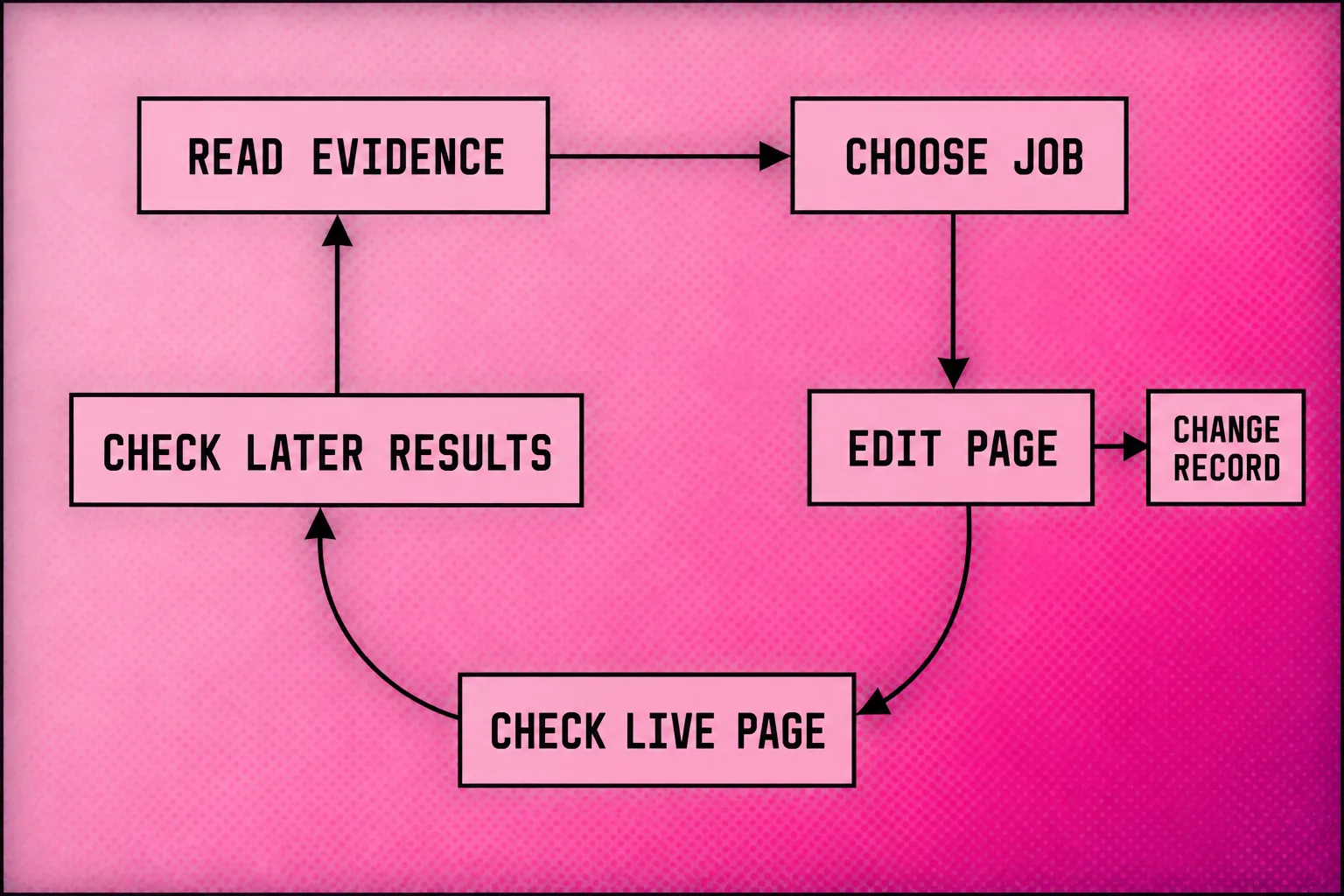
How do you know whether SEO is working?
Use Google Search Console to check search performance, then compare website activity with completed enquiries or sales. Search Console reports queries, impressions and clicks; Analytics reports website behaviour.[6] I recommend judging progress against the service you chose to improve.
For your target page, look for changes in the searches bringing visits. Then read the enquiries themselves. Are people asking for work you sell, in a place you serve?
| Observation | My next check |
|---|---|
| Google can't access the page. | Fix the access issue before adding copy. |
| The page gets unrelated enquiries. | Check the search target and service explanation. |
| Visitors arrive but enquiries don't. | Test the form and read the page as a customer. |
| Relevant enquiries arrive. | Record the outcome and check which work deserves attention next. |
Compare similar periods and note changes in your business or market. Record completed work, because a visit and a sale answer different questions.
Google says some changes take a few hours, while others can take several months.[7] It recommends waiting a few weeks before assessing the effect.[7] Those times describe possible search effects, not a deadline for new customers.
Can you use ChatGPT to help with SEO?
Yes, ChatGPT can assist with SEO ideas and drafts, but you should edit and verify its output before publishing.[10] Google stresses originality, accuracy and human effort in content.[9]
Give the tool your actual business facts and customer questions. Ask it to find missing answers before asking for more copy.
Try this prompt with information you're comfortable sharing:
> Review this service-page draft against the customer questions I provide. List missing answers and unclear claims. Use only my supplied business facts. Flag claims that need evidence. Suggest a clearer outline without changing my offer or inventing results.
Read each proposed claim against your own records. Open the revised page after publishing and test its links and form.
Google warns against automation that produces content primarily to manipulate rankings.[9] Keep the purpose tied to helping a customer complete a task.
Our AI SEO explanation covers how we organise assisted work. Our managed services include AEO for answers in search and AI tools. They also include GEO for generative AI answers.
When should you get help with SEO?
Get help with SEO when the next job exceeds your technical skills or you can't keep doing the work. I would also involve a specialist before a website migration, international expansion or a complex ecommerce change. Spicy Web's guide identifies those specialist situations.[11]
Use the problem to choose the person:
| Problem | Help to consider |
|---|---|
| You can explain the service but struggle to draft the page. | An editor or writer working from your facts. |
| Google can't see content or your changes break the site. | A developer and technical SEO specialist. |
| A move will change important URLs. | SEO migration support before launch. |
| You need multiple languages or complex product listings. | A specialist in that website's requirements. |
| Research, edits and checks keep slipping. | Someone to own the continuing work. |
Google documents access and rendering faults as possible search barriers.[2] A writing tool can't resolve a fault you haven't identified.
Prepare a handover pack before hiring: Search Console findings, your priority services, the pages you changed and your enquiry records. Ask who will implement the fixes and who will test the live result.
The Australian SEO cost guide can help with the spending decision. My Australian agency shortlist can help you compare providers. Ask for a scope you can read and work you can inspect.
Where does Searchmaxxed fit?
Searchmaxxed runs the SEO work when you want a team to take it on. We use agentic SEO, which means AI agents help research and prepare changes. Our Managed Search Loop connects that work to your plan, with a person approving every public change.
The agents plug into your whole Search Console and GA4, Google's website analytics tool. Every week, they scrape competitor sites, read Google results and check what AI answers say about you.
Our Managed Search Loop uses those inputs to choose the next job. We build pages and make fixes on your Agentic Website. We also add schema, facts in code that describe page content, and internal links.
Your Agentic Website lives on GitHub and Vercel. You own the site, repository, content and data. A person checks each change before it goes live, then the agents measure the result for the next cycle.
Our Off-Page Source Layer covers links, reviews, citations, press and mentions on other sites. The SEO service brings the website and external work together.
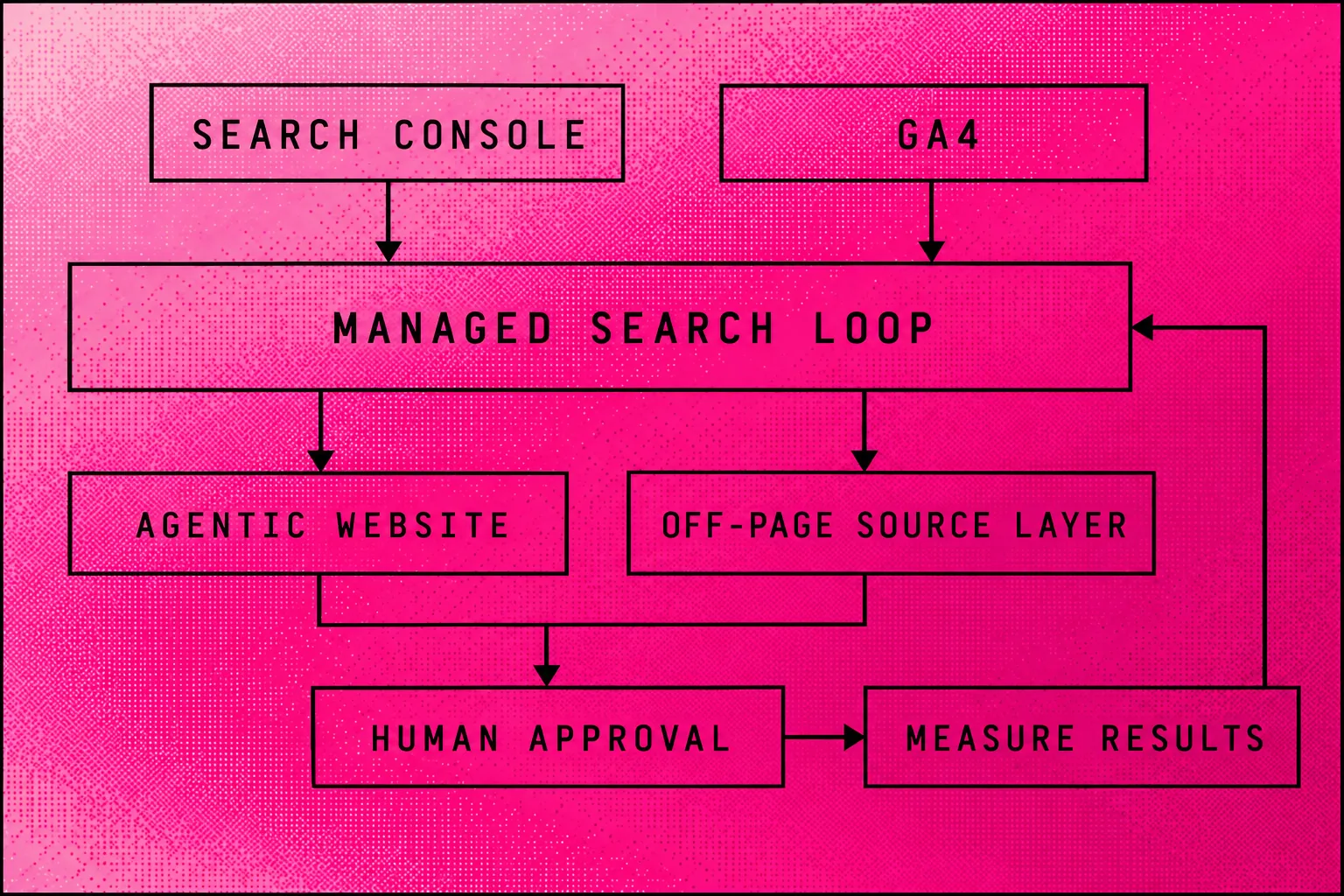
Choose a package by the work you need:
| Package | What it includes |
|---|---|
| Local Search | Local pages, Business Profile management, reviews, local links, listing cleanup and local AI tracking. |
| Growth System | Page releases, technical fixes, schema, internal links, landing-page work, source records and AI tracking. |
| Agentic Search Engineering | Growth System work, plus more page releases, digital PR, link campaigns and broader AI-answer tracking. |
| Custom & Enterprise | An agreed scope that can include multiple markets, dedicated engineering and original research. |
Entry options include the Agentic Website Full Build, Agentic Migration and AI SEO Audit. The Full Build covers research, design, pages and measurement. The Migration retains a design worth keeping and moves the site to owned infrastructure. The Audit identifies gaps, ranks fixes and gives you a plan.
The package details explain the inclusions. Let's talk pricing.
Frequently asked questions
How do I do SEO on my own?
Can ChatGPT do SEO?
Can a beginner do SEO?
Yes, a beginner can start with the improvements Google explains in its Starter Guide.[1] Focus on a page you understand and can edit. Get technical help when you can't explain the fault or test the proposed fix.
How can a beginner learn SEO?
Can I do SEO myself for free?
How do I do SEO for my blog?
How do I do SEO in HTML?
Can I do SEO for a single-page website?
Do I need schema before I start SEO?
Will an SEO plugin do the work for me?
A plugin can assist, but its green indicator doesn't mean your website's SEO work is complete.[13] Check the live page, customer answer and Google access alongside the plugin's suggestions.
Can I run a search improvement loop without a retainer?
Yes. Choose a job from your search data. Make and review the change, then test the live page. Record enquiries and decide what to do next. Assign someone to keep that weekly routine going.
Do I need an Agentic Website to do SEO myself?
No. Google's Starter Guide covers improvements to existing sites.[1] Start with a website you can edit and measure. Get help if its setup stops you making the changes your business needs.
How do I build links and reviews myself?
For DIY work, start by correcting your business details on relevant listings. Then ask real customers for reviews and check that each published record is accurate. Links, press and mentions come from genuine relationships, so build those over time.
- Google Search Central: Search Engine Optimization (SEO) Starter Guide
- Google Search Central: In-depth guide to how Google Search works
- Spicy Web: What is SEO? Free tools and measurement
- Google Search Central: Creating helpful, reliable, people-first content
- Impressive: The Basics Of SEO: plugin limitations